NixOS Dual Booting (Sort Of)
Last updated: 1 day, 12 hours ago
Intro
Recently, I had the idea, "Why can't I run two Linux flavours on my NixOS laptop?" Well I can and now I am!
I am not dual booting. I am using two separate config files to give me a GNOME setup in one generation and a terminal-only environment in another generation. This gives me two completely different NixOS environments while using the same drive and user settings and files, but not requiring partitioning of the drive and two full-fledged distro installs. The Insanity of it!
Note: this is for traditional non-flake NixOS
How It Works
I have one configuration file named gnome.nix. In it, I have all the required packages to run GNOME and I import the 'common.nix'. Then I have another file called terminal.nix, this one has all the terminal-only packages and also imports the 'common.nix'. And then I have a third config file called common.nix, and this one has packages and configs that are common to both configurations.
To import that common.nix config file, we add it to the imports section of each GNOME and Terminal config files:
  imports =
    [ # Include the results of the hardware scan.
      ./hardware-configuration.nix
      ./common.nix
    ];
My first thought was how do I tell them apart on the generation selection screen? NixOS has already thought of that:
system.nixos.label = "TERMINAL";
This adds TERMINAL to the generation listing during boot time. I set one config to TERMINAL and the other to GNOME.
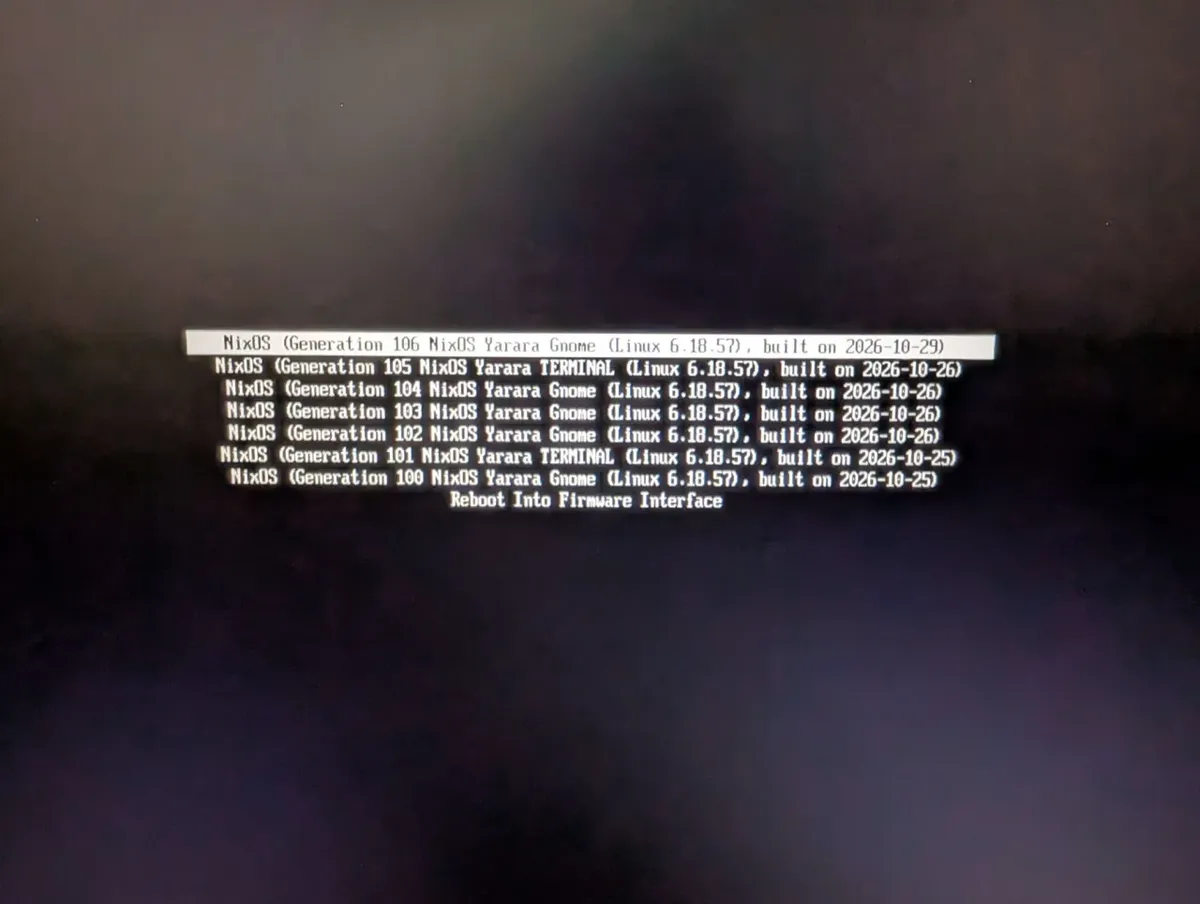
Ok, so the next problem is how do I build one or the other when I need to. Of course, NixOS already has figured that out as well with a -I flag that allows you to specify the build:
sudo nixos-rebuild boot -I nixos-config=/path/to/config/file.nix
After that, I bound that command to easy-to-remember rebuild command for each build file, and put it in my common config file as an alias:
  environment.shellAliases = {
    rebuild-gnome = "sudo nixos-rebuild boot -I nixos-config=/etc/nixos/gnome.nix";
    rebuild-terminal = "sudo nixos-rebuild boot -I nixos-config=/etc/nixos/terminal.nix";
  };
I chose to go with the boot flag because it's ... "safer" as an alias. I don't always know when I need boot vs switch, so if the alias is boot then I know it's always build and reboot to get changes. And I don't need two more aliases for switch command rebuilds. It comes down to being lazy and making it easy and predictable.
Side Effects and Gotchas
An interesting caveat to this method is that "sudo nix-collect-garbage -d" will remove all generations beyond the one you are currently on. Meaning if you are on GNOME, your terminal generation will be wiped out and you will need to rebuild it again. Of course, with the alias that we set up, this isn't that hard to do.
A couple of things that seem obvious but messed with my head for a bit:
- rebuilding one doesn't rebuild the other
- you don't need to rebuild to switch environments, just reboot and choose the right generation
I think both of these brain benders stem from using NixOS as a single environment for so long. You make a change, rebuild, and everything updates. Not sure if I am explaining this correctly, mostly because this is now in hindsight and seems really dumb to me. But I did struggle with it, so it's worth mentioning, right?
Conclusion
Now I can build and boot from either file I want and I just wanted to share that and document it for future me.
Oh, the reason I chose GNOME and terminal as my two flavors:
- GNOME is for when I need my GUIs: Office, Web browser, OBS, etc
- Terminal for distraction free programming and writing. I have really been trying to move to an all terminal lifestyle. Neovim and Tmux have been a great help in getting me there. And I just found Yazi which is a nice terminal file explorer. I've been using w3m for the CLI browser but CLI browsing is not great.
If you want me to elaborate on anything, please message me on Discord, Mastodon, X, or email me. I’ll be happy to go into more detail one-on-one or to create more posts.